8 July 2026
·How to Actually Use Figma's New AI Agent in Your Design Workflow
Figma's agent can generate variants, bulk-edit files, and pull in live web context. Here's where it earns a real place in a senior designer's process, and where it doesn't.
Figma shipped an actual agent onto the canvas this year, not another autocomplete feature bolted onto the toolbar. It rolled out in beta in May, then got a lot more capable at Config in June: web search, generative plugins, MCP connections to tools like Notion and GitHub, file attachments. If you want the full rundown of everything announced, I wrote that up separately. This one is about something narrower and more useful day to day: how to actually fold the agent into your process without it becoming either a gimmick you never open or a crutch that dulls your judgment.
What it's actually good for
The agent earns its place on the mechanical, high-volume parts of design work that don't need your taste applied one decision at a time.
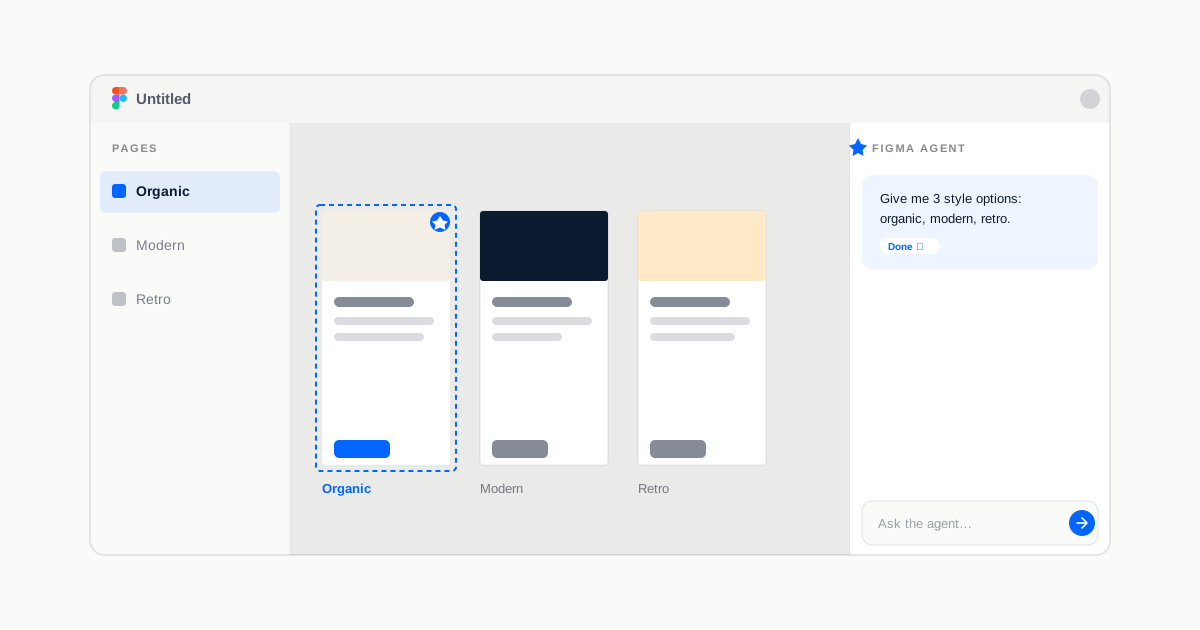
Generating a spread of directions fast. Prompt it with something like "give me three style options for this onboarding screen: organic, modern, and retro" and you get three real starting points to react to in the time it'd take to sketch one by hand. You're not shipping any of them as-is. You're using them to see the shape of the decision space before you commit to one.
Bulk mechanical edits. Renaming variables for consistency across a file, swapping a component everywhere it appears, applying a padding change across an entire flow. This is exactly the kind of work that used to eat an hour before a design review and now takes a prompt and a five-minute review pass.
Populating frames with real content. The agent can search the web and pull in live, current information instead of lorem ipsum or a fake "Acme Corp" logo. A pricing table populated with actual competitor numbers, a dashboard populated with realistic data, reads completely differently in a stakeholder review than one full of placeholder text everyone mentally discounts.
Design system upkeep. Bulk-updating component descriptions, standardizing naming conventions across a library, documenting variants and states. Necessary work that almost never gets prioritized on its own because it's tedious, not because it's unimportant.
Get the free Promotion Readiness Checklist
A one-page self-assessment used by designers 3–7 years in.
Where I'd still do it myself
Defining the interaction model for something genuinely new. If there's no established pattern to riff on, the agent's first guess becomes an anchor whether you want it to or not. Anchoring on a plausible-looking wrong answer is worse than starting from a blank frame, because it's harder to notice you're anchored.
Taste calls on anything brand-critical. The three style directions the agent gives you are a menu, not a shortlist. Treating agent output as a decision rather than an input is the single most common way I've seen designers get this wrong.
Accepting bulk edits without a diff pass. It will rename forty components confidently and get three of them wrong in a way that only shows up when a developer implements it two weeks later. Review before you merge, every time, no exceptions.
How to actually start this week
Don't try to rebuild your whole process around it on day one. Pick the single most annoying recurring task in your week, the renaming pass before a crit, the placeholder content you always mean to swap out and never do, and hand that one thing to the agent for two weeks straight. See what you accept as-is, what you edit, and what you throw out.
That pattern tells you more about where this fits your actual workflow than any keynote demo will. It's currently available for Full seat users on Professional, Organization, and Enterprise plans, with Collab and Dev seats able to use it in drafts. During beta it doesn't consume credits — that changes at general availability, so it's worth building the habit now while it's free.
The agent is a fast, well-briefed intern. It has no context on your users, no stake in the decision, and no instinct for when a plausible answer is actually the wrong one. That part is still yours.
The Senior Designer's AI Playbook covers how to use tools like this for problem framing, research synthesis, and decision-making, the judgment that keeps AI a multiplier instead of a crutch.
Get the free AI Tool Audit for designers
A one-page checklist to decide which AI tools earn a place in your workflow, and which are just noise.
Go deeper on AI in your design practice
The Senior Designer's AI Playbook covers 7 chapters on how to use AI for problem framing, research synthesis, decision-making, and demonstrating impact — without outsourcing the thinking.
Get the AI Playbook · €3930-day money-back guarantee